

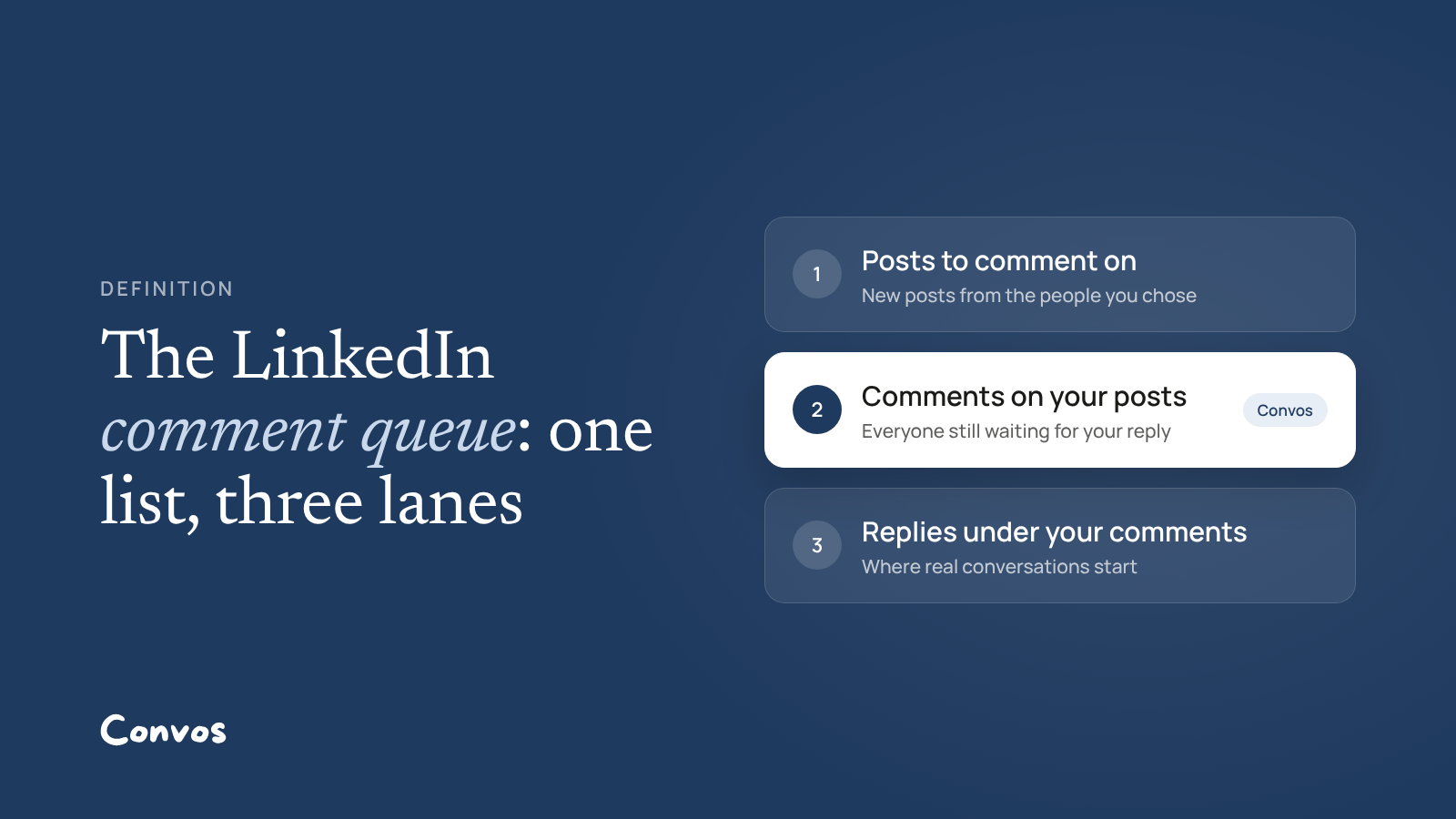
In short: a LinkedIn comment queue is a daily list of the posts worth commenting on and the comments waiting for your reply, gathered in one place so you can clear them in a single sitting. You still read every post and write every word yourself: the queue removes the hunting, not the thinking. It is the opposite of an AI comment tool or an engagement pod, both of which LinkedIn now demotes.
Key takeaways
- A comment queue has three lanes: new posts from people you chose, comments on your own posts, and replies under your comments.
- Replying to comments on your own posts is linked to about 30% more engagement, across 72,000 posts studied by Buffer.
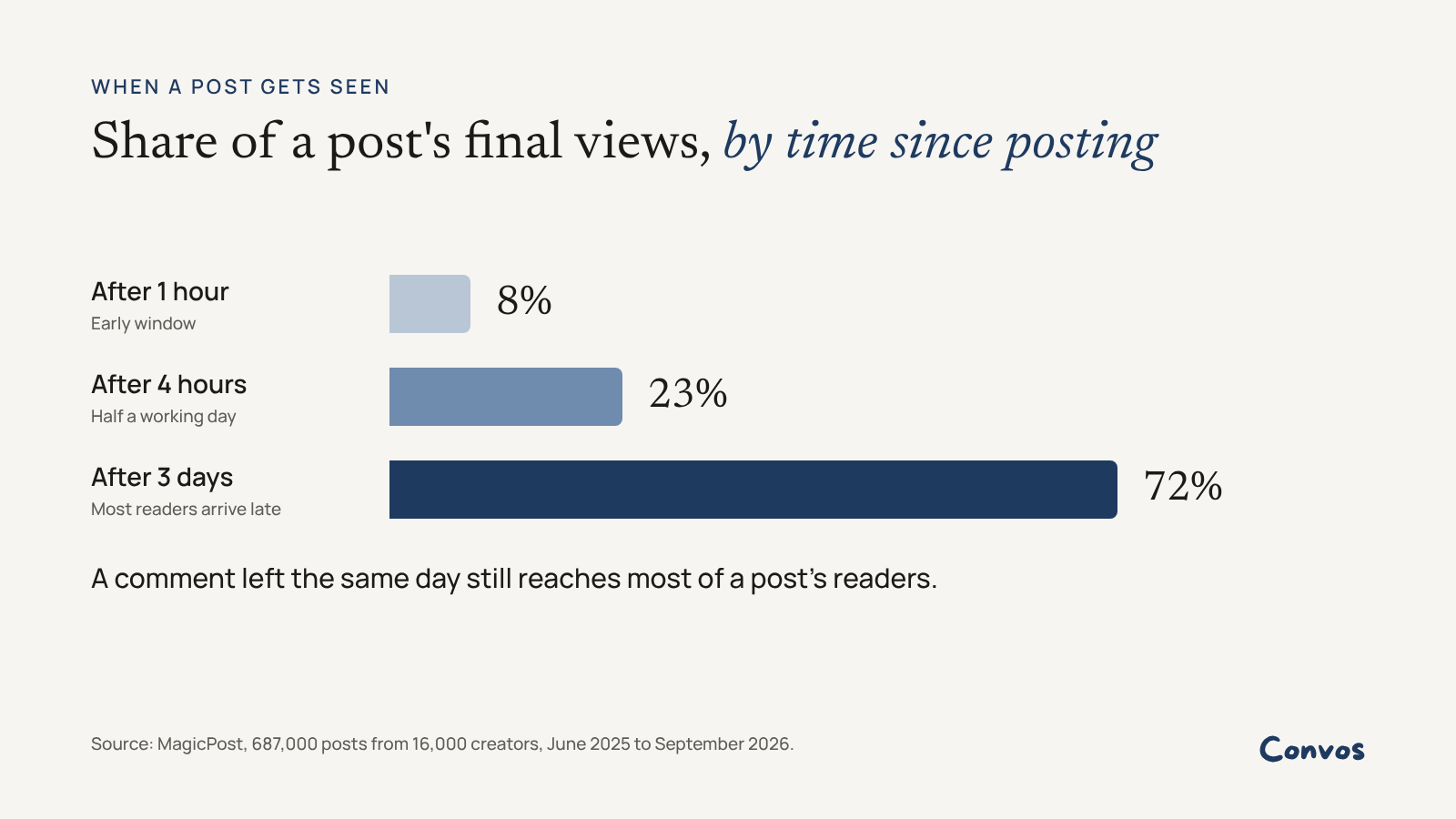
- Timing matters, but less than people think: a typical post has only 23% of its final views after 4 hours, so a daily queue still reaches most readers.
- LinkedIn removes automated comments from the “Most relevant” view, so a queue only works if a human writes and sends each comment.
- You can run a comment queue by hand with notifications, or use a tool that builds it for you.
What is a LinkedIn comment queue?
A LinkedIn comment queue is a to-do list for conversations. Instead of scrolling the feed and hoping the right posts appear, you start each session with a short, ordered list: the posts you should comment on today and the people waiting for an answer from you.
The idea comes from how inboxes work. Email is manageable because messages wait in one place until you deal with them. LinkedIn conversations are scattered across the feed, your notifications and other people’s comment threads, so the important ones get lost. A comment queue puts them back in one place.
Two things a comment queue is not. It is not a writing tool: nothing is drafted for you. And it is not automation: nothing is posted, liked or sent unless you do it.
The three lanes of a comment queue
Every good LinkedIn comment queue holds the same three kinds of item. Each one earns its place for a different reason.
| Lane | What it holds | Why it matters |
|---|---|---|
| Posts to comment on | New posts from the people you chose to follow closely | A comment in the first half hour earns about 4x the impressions of the same comment a day later (LinkHub data, 657,722 comments, via Taplio) |
| Comments on your posts | Everyone who commented on your posts and has not had a reply | Author replies are linked to about 30% more engagement (Buffer, 72,000 posts) |
| Replies under your comments | People who answered a comment you left elsewhere | Replies under a comment lift its reach up to 2.4x (AuthoredUp, about 1M posts, via Taplio) |
Sources: Taplio, “How to be the comment guy” and Buffer, December 2025. Buffer notes that its result is a correlation, not proof of cause, and the Taplio figures are third-party data reported by a vendor.
The second and third lanes are the ones most people forget. Answering a comment on your own post feels optional, yet it is the cheapest engagement you will ever get: the person is already interested.
Why a queue beats scrolling the feed
The feed is built to keep you reading, not to help you keep up with people. It decides what you see, and it mixes the posts you care about with everything else. A queue reverses that: you decide who matters, and the list waits for you.
It also fixes the timing problem without forcing you to live on LinkedIn. MagicPost’s analysis of 687,000 posts from 16,000 creators found that a typical post has 8% of its final views after 1 hour, 23% after 4 hours and 72% after 3 days (MagicPost, 2026). Early comments get more visibility, but a comment left the same day still lands in front of most of the post’s eventual readers.
Comment queue vs AI comments vs engagement pods
All three promise more engagement. Only one of them is within LinkedIn’s rules.
| Method | Who writes | Who sends | LinkedIn’s position |
|---|---|---|---|
| Comment queue | You | You | Normal use |
| AI comment tool | Software | Often software | Automated comments “aren’t allowed” and are removed from “Most relevant” |
| Engagement pod | Pod members or a script | Pod members or a script | Pods “erode trust and are not allowed” |
In February 2026, LinkedIn VP of Product Gyanda Sachdeva defined automated comments as those posted “without any human oversight or review”, and said they are removed from the “Most relevant” ranking, can be limited to the commenter’s direct connections, and that repeat offenders are restricted (Social Media Today, 16 February 2026). A month later LinkedIn added that comments made with “a browser extension, script, or third party tool” are not allowed, and that pods are not allowed either (LinkedIn News, 13 March 2026).
The quality argument is just as strong. ContentIn found that 41% of comments get zero engagement, in a sample of 250,000 comments from 5,500 users (ContentIn, 16 May 2026). Generic comments are the ones nobody answers, and a queue gives you the time to write something specific instead. For more on choosing tools on this line, see our guide to LinkedIn comment tools without AI.
How to build a LinkedIn comment queue by hand
You can run a comment queue with nothing but LinkedIn itself:
- Choose your people. Pick the clients, peers and creators you want to be known by, and turn on post notifications (the bell on their profile).
- Set one daily slot. PostFast’s synthesis of large datasets points to Tuesday to Thursday, 8 to 11 am local time, as the strongest window for posting, which is when most of the posts you want to comment on appear (PostFast).
- Clear your own posts first. Open your notifications and answer every comment that has no reply yet.
- Then comment on others. Work through the new posts from your list. ContentIn recommends around 5 thoughtful comments a day rather than volume (ContentIn, 28 March 2026).
- Finish with replies under your comments. These are the threads where real conversations start.
Keep each comment specific: a point you agree or disagree with, an example from your work, or a question. Taplio suggests 15 to 40 words as a useful range.
Tools that build the queue for you
The manual method works, but notifications are noisy and easy to miss. A comment queue tool does the gathering for you.
Convos is the tool we built for exactly this. Each morning it lines up new posts from the people you chose, comments on your posts still waiting for a reply and your pending invitations, in one queue you clear in about 15 minutes. It writes nothing: you type every comment, and each one is sent from your own browser through the Chrome extension at a human pace (pricing).
Whatever you use, check two things. First, does a human write every comment? Second, does a human press send? If the answer to either is no, it is not a comment queue, it is automation. Our overview of the best LinkedIn engagement tools sorts the market on exactly that line.
How to tell if your comment queue works
Since February 2025, LinkedIn shows comment impressions, counted “each time someone views your comment” and visible only to you (Social Media Today, 25 February 2025). Check them weekly, alongside replies received and new connections from people you commented on. If those numbers rise, the queue is doing its job. If you want to try one built for you, Convos has a free plan.